
ED Interplay

ED Interplay Tool Lite: security and privacy description

Summary for reviewers

ED Interplay Tool Lite is an EDGY modelling tool that runs in the browser, with no back-end server, no user accounts and no database. The user's model is processed and stored only on the user's own device; it is never sent to the service provider or to third parties.

QuestionAnswer
Does the model or imported material go to a server?No. Imports (CSV, Excel, model files, draw.io) are read and processed in the browser.
Where is the model kept?In the file the user saves on their own disk, and as a temporary backup in the browser's own storage.
Is personal data collected?The service collects none. No sign-in, no analytics and no tracking cookies. Loading the page creates the web server's usual access logs (IP address, time, requested file).
Does Lite use outside services?Not in its features. All code is loaded from Lite's own address. draw.io's cloud storage options are switched off. Links in the help to outside pages open only when the user clicks them.
Can the claims be checked?Yes, with the browser's developer tools and by cutting the network connection (see How to verify the claims yourself).
Can an organisation run Lite itself?Yes. Lite is a static website that can be installed on the organisation's own web server.

This description covers version 0.2.20 (released 4 November 2026) and later. It is updated whenever Lite's security or data flows change.

What Lite is and how it works

ED Interplay Tool Lite is a free tool that runs in the browser for describing the structure of a business or an organisation in the EDGY design language. With it you import existing material (for example tables and diagrams), form a single model from it, and look at it as diagrams and tables.

Technical structure

  • Lite is a static website: HTML, JavaScript and CSS files. It has no application server, database, API or user accounts.
  • When the user opens edinterplay.com/lite, the browser loads the application's files. From then on all processing happens in the user's browser.
  • The modelling editor is based on the open-source draw.io (Apache 2.0), packaged with Lite and loaded from the same address. draw.io's cloud storage options (Google Drive, OneDrive, GitHub and others) are switched off.
  • Traffic is encrypted (HTTPS, a TLS certificate from Let's Encrypt).
  • A strict content security policy (CSP, connect-src 'self'): the browser allows connections only to Lite's own address.
  • On the first visit the browser keeps all of the application's files in its cache (service worker), so Lite starts quickly and also works without a network connection.

Working without a network connection

Lite needs a network connection only to load the application. Working with the model never needs one, because nothing is sent to a server.

  • Once Lite has been opened online, it works entirely without a network connection: import, editing, diagrams and saving, for example on a laptop while travelling.
  • If Lite has never been opened in that browser, or the browser's cache has been cleared, the first visit needs a network connection.

For security, working offline is also proof: with the network cut, the model cannot leave the device.

Typical use

  1. The user opens Lite in the browser.
  2. The user imports material from their own computer, or starts from scratch or from an example. The examples are fictional and come from Lite's own package.
  3. Lite forms the model in the browser's memory. The file is not sent anywhere.
  4. The user edits the model and saves it as a file on their own disk or in the organisation's storage.
  5. Next time the user opens the saved file again.
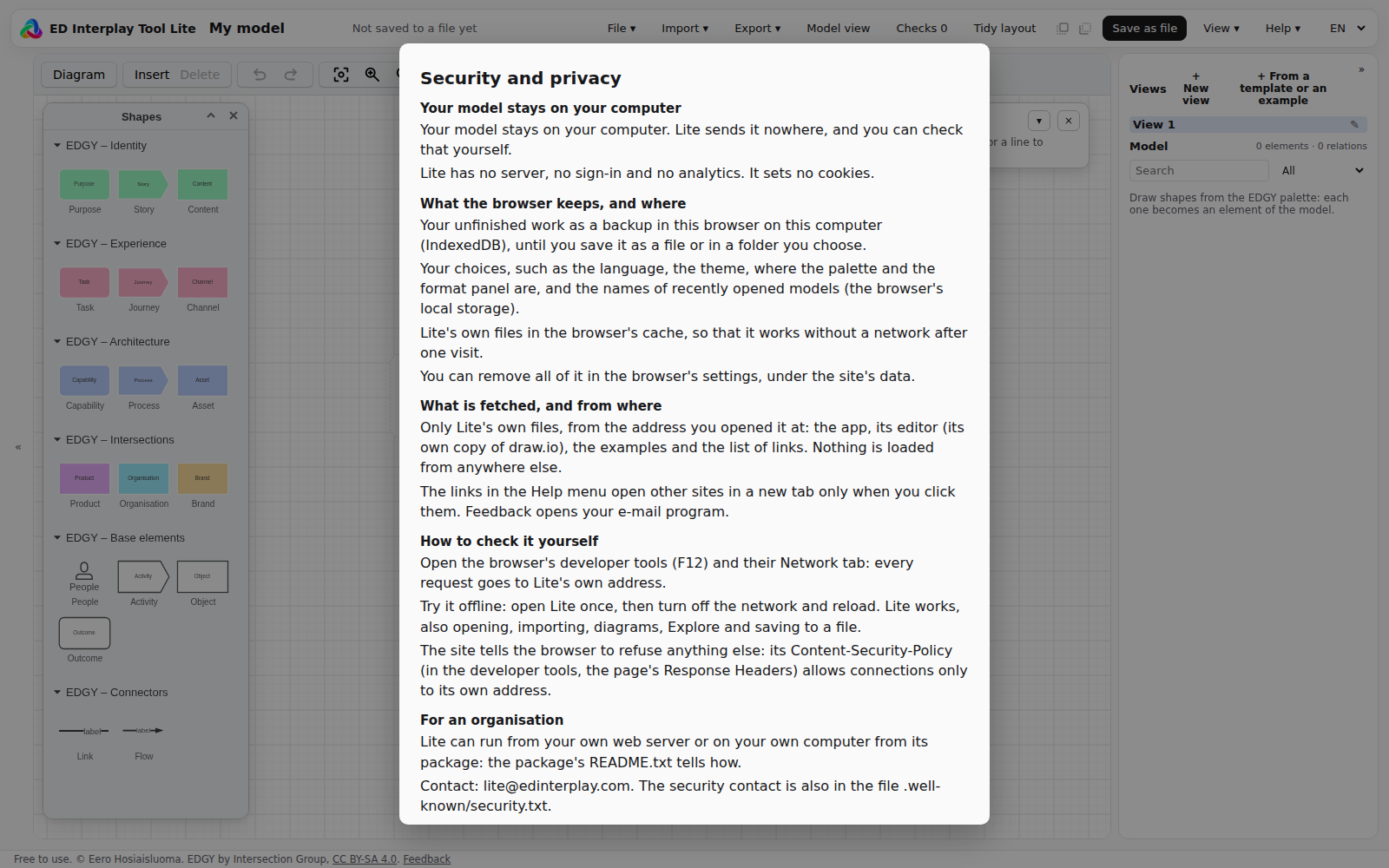
Lite's Security and privacy window

Data flows

Below are all the situations in which Lite or the browser connects to the network, and what does and does not travel.

SituationToWhat travelsThe user's model included?
Opening and updating LiteLite's own web server (edinterplay.com)The application's files are loaded. The server's access log keeps the IP address, time, browser identifier and requested file.No
Examples, gallery and import templatesLite's own web serverFictional examples and the Excel template are loaded from Lite's package.No
Importing a fileNot to the networkThe browser reads the file locally.It does not leave the computer
SavingThe user's disk or the organisation's storageThe browser's save dialogue (File System Access API) or an ordinary download.Only to the place the user chooses
BackupThe browser's own storage (IndexedDB, localStorage)A temporary copy of the model in this browser, not on a server.It stays on the device
FeedbackThe user's own email program (mailto)The user writes and sends the message to Lite's feedback address themselves.No, unless the user attaches it
Links in the help and guidesOutside pages, such as EDGY material and the full editionOpen in a new tab only when clicked.No

What Lite does not have: no analytics, no tracking cookies, no advertising, no outside fonts or content delivery networks (CDN), no AI services and no automatic error reporting.

Privacy

The service provider does not process the user's model. Because the model never leaves the user's device, Lite's maintainer is neither the controller of the data in the model nor a processor of personal data. The organisation using Lite is itself responsible for what data goes into the model and where the file is saved.

Personal data in the model. Lite neither asks for nor requires personal data. The model can contain it only if the user writes or imports it, for example as an owner's name. We recommend describing responsibilities as roles or organisation units, not as people's names. This is also good EDGY modelling practice.

The web server's access logs. Opening the site creates the web server's usual logs (IP address, timestamp, browser identifier, requested file). The logs are created on the hosting provider's (Domainhotelli) server. Lite's maintainer uses them only to monitor the service's operation and security, never combines them with other data and builds no user profiles from them. If the organisation installs Lite on its own server, these logs too stay under the organisation's own control.

Feedback. Feedback by email travels through the user's own email. The sender's address and message are used only to reply to the feedback and to develop the product.

Cookies. Lite uses no cookies. The browser's local storage is used only for functional purposes (backup, language and view settings), and it is never read by a server.

Where the data is. The user's model is only where the user saves it. Lite's application files and the access logs are on a Finnish hosting provider's servers; the exact data centre location can be confirmed through the contact details if needed.

This description is not a legal assessment. The organisation's data protection officer assesses the use according to the organisation's own practices.

Security: protections, risks and their management

Current protections

No attack surface on the server. No sign-in, passwords, database or API, so users' models cannot leak from the server: they are not there.

Encrypted connection. All traffic over HTTPS.

Content security policy (CSP). The browser technically blocks connections to anywhere but Lite's own address, also in case of a fault or a breach.

No third-party code at run time. All libraries (such as draw.io and Cytoscape.js) are packaged with Lite and loaded from the same address. They are widely used open-source libraries (Apache 2.0, MIT).

An automatic test in every release. The test makes sure that Lite connects to no other address and that it works without a network connection.

Cloud storage off. draw.io's integrations with outside cloud services are switched off.

Browser isolation. Lite runs in the browser's ordinary sandbox. Files are reached only as the user chooses them.

Works in corporate networks. The gallery, import templates and the Excel template are in Lite's own package, so Lite needs no connections to other addresses.

Reporting vulnerabilities. Contact details are in the standard file edinterplay.com/.well-known/security.txt (RFC 9116).

Risks and their management

RiskDescriptionManagement
A shared computerThe browser's backup stays on the device, and another person using the same user account could see it.Use your own user account. Clear the browser's storage when needed. A browser and device managed by the organisation.
A breach of the websiteIf the hosting server were breached, an attacker could change the code that is loaded.The content security policy (CSP) prevents sending data elsewhere. A self-hosted installation on the organisation's own server removes the dependency on an outside website entirely.
Vulnerabilities in librariesVulnerabilities may appear in the packaged libraries.The libraries are updated with Lite's releases. There is no server-side code, so the impact is limited to the user's own browser session.
The update pathThe service worker fetches a new version from Lite's address.Updates come only from the same address over HTTPS. In a self-hosted installation the organisation decides when to update.
User errorConfidential information is saved in the wrong place or sent in feedback.Guidance: save in the organisation's storage, no confidential information in feedback.

Lite is not a critical system: it does not process customer or patient data and is not connected to the organisation's systems. Its security rests first of all on the fact that data does not leave the user's device.

How to verify the claims yourself

The claims can be checked without special tools, with an ordinary browser's developer tools. Use fictional material for the test.

  1. Network traffic. Open the browser's developer tools (F12) and the Network tab. Load Lite, import a test file, edit the model and save. Every request goes to Lite's own address, and none of them sends the imported material.
  2. Offline. Once Lite has loaded, cut the network connection (or choose Offline on the Network tab). Import a file and make changes: everything keeps working, because the processing happens in the browser.
  3. Cookies and storage. The Application tab (Chrome, Edge) or Storage tab (Firefox) shows that there are no cookies and that local storage holds only Lite's backup and settings.
  4. Outside addresses. With the Network tab's filter you can make sure the page loads nothing from another domain.
  5. Source code. The loaded JavaScript can be read in the developer tools (Sources). The organisation can also ask for the installation package to review and run in its own environment.

Recommendations for organisations

  1. Data classification. Use Lite according to the organisation's data classification. Lite suits describing public and internal information (for example services, processes, capabilities and systems). Handling confidential or security-classified information calls for the organisation's own assessment.
  2. Roles, not names. Describe responsibilities as roles and organisation units, so that no personal data enters the model.
  3. Where to save. Save model files in storage the organisation has approved (for example a network drive or a workspace's files), so that the organisation's access rights and backups apply to them.
  4. A managed device and browser. Use a device and browser managed by the organisation. On a shared computer, clear the browser's storage after use.
  5. A self-hosted installation. If the organisation wants to remove the dependency on an outside website, Lite can be installed on the organisation's own web server or intranet. Installing means copying static files; no server software or database is needed.
  6. Pilot use. Start with fictional or public material and run the verification tests (see the previous section) before wider use.

Contact

The application's address: https://edinterplay.com/lite (opens in a new tab)

Further information is available on request.

Change history

DateChange
4 November 2026First version (Lite 0.2.17–0.2.18)
5 November 2026Updated for Lite 0.2.20: content security policy, full offline use, automatic connection test and security.txt