ED Interplay

ED Interplay Tool: features

Summary

ED Interplay Tool is an EDGY modelling tool and enterprise architecture tool (EA tool) with which an organisation describes and manages its whole: its purpose, customer journeys, services, processes, capabilities, data and systems. Every view comes from the same repository, so different groups of experts look at the same whole, each from their own perspective.

At its core, ED Interplay Tool is about managing dependencies: it shows how customer journeys, processes, capabilities, data and systems connect, and what a change affects.

The tool is made for business developers, enterprise architects, service designers and management. It brings these groups into shared work: the service designer describes a customer journey, the architect sees which processes, data and systems support it, and management sees where development is best directed.

Modelling languageEDGY, the open design language developed by Intersection Group
ApproachEnterprise Design: business, experience and architecture in one description
UseIn the browser, a shared model repository for many users
InstallationIn the organisation's own environment as containers, under a licence
LanguagesFinnish and English
Free trialED Interplay Tool Lite, a free browser-based modelling tool: edinterplay.com/lite

The tool is for enterprise architecture at the logical level. It is not a CMDB nor a GRC system, although it covers some of the same ground and can import their data.
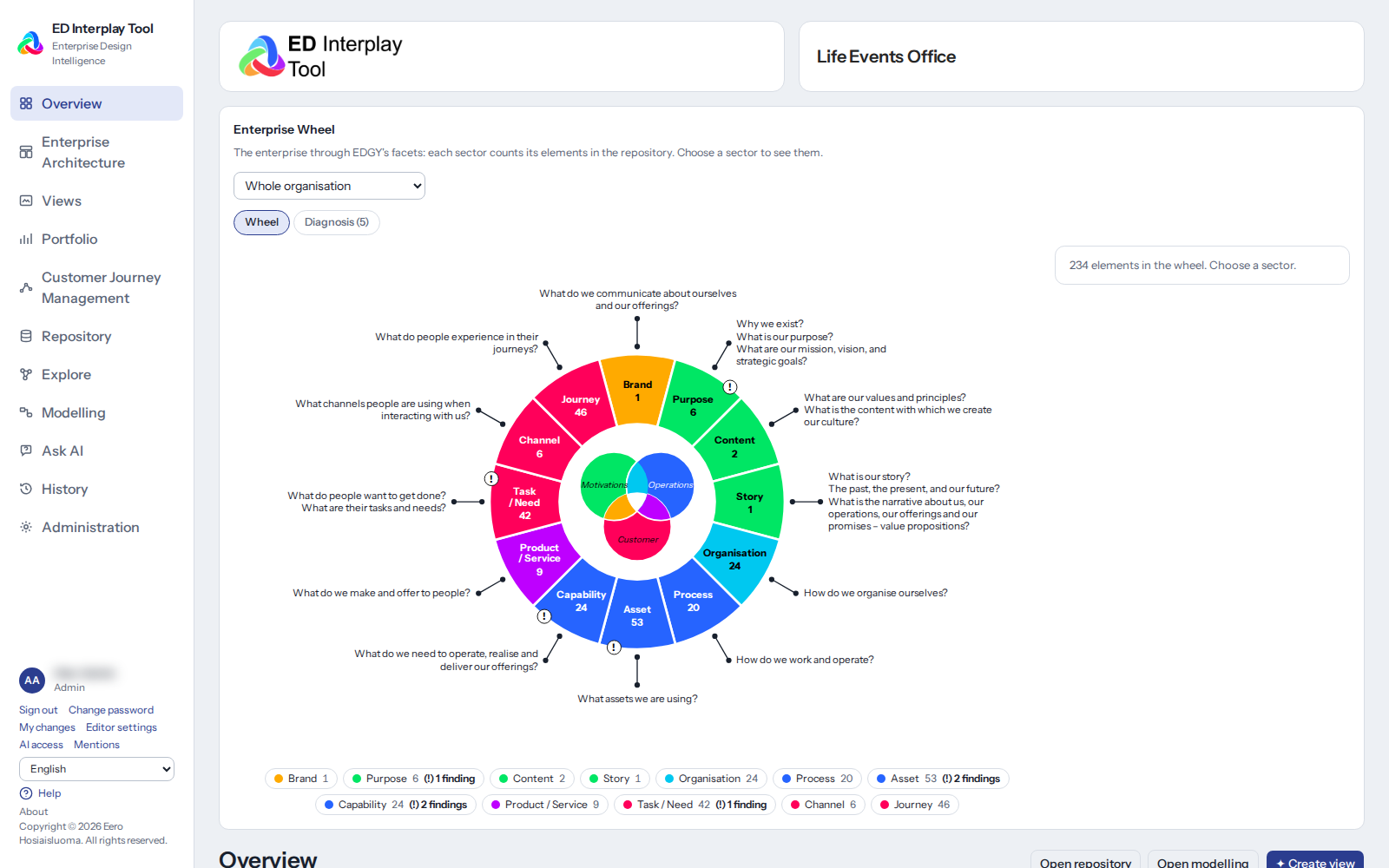
The home page and the Enterprise Wheel

One model and a shared language

EDGY as an easy shared language. The model is built from EDGY's four base elements (People, Activity, Object, Outcome) and two relationships (Link and Flow). EDGY's three facets, identity, architecture and experience, and their intersections organisation, brand and product give every element its place in the whole. The language is simple enough that EDGY modelling is learnt quickly without modelling training.

Metamodel and specialisations. Every element is based on an EDGY base element. The tool comes with ready specialisations, for example Asset → Application or Object → Initiative. This way the tool covers the needs of enterprise architecture while the model stays true to EDGY and compatible with it.

The truth principle. Everything the tool shows is computed from the repository's elements and relationships, and every view takes you straight to the elements. Change something once, and the change shows in every visualisation: every diagram, table and analysis. Nothing is maintained in two places.

Ownership as roles. Responsibilities are described as organisation units or roles, not as people's names. The model stays up to date whoever comes and goes, and no personal data enters it.

Views for different groups of experts

The main menu is organised by what is being described. Every view reads from and writes to the same repository.

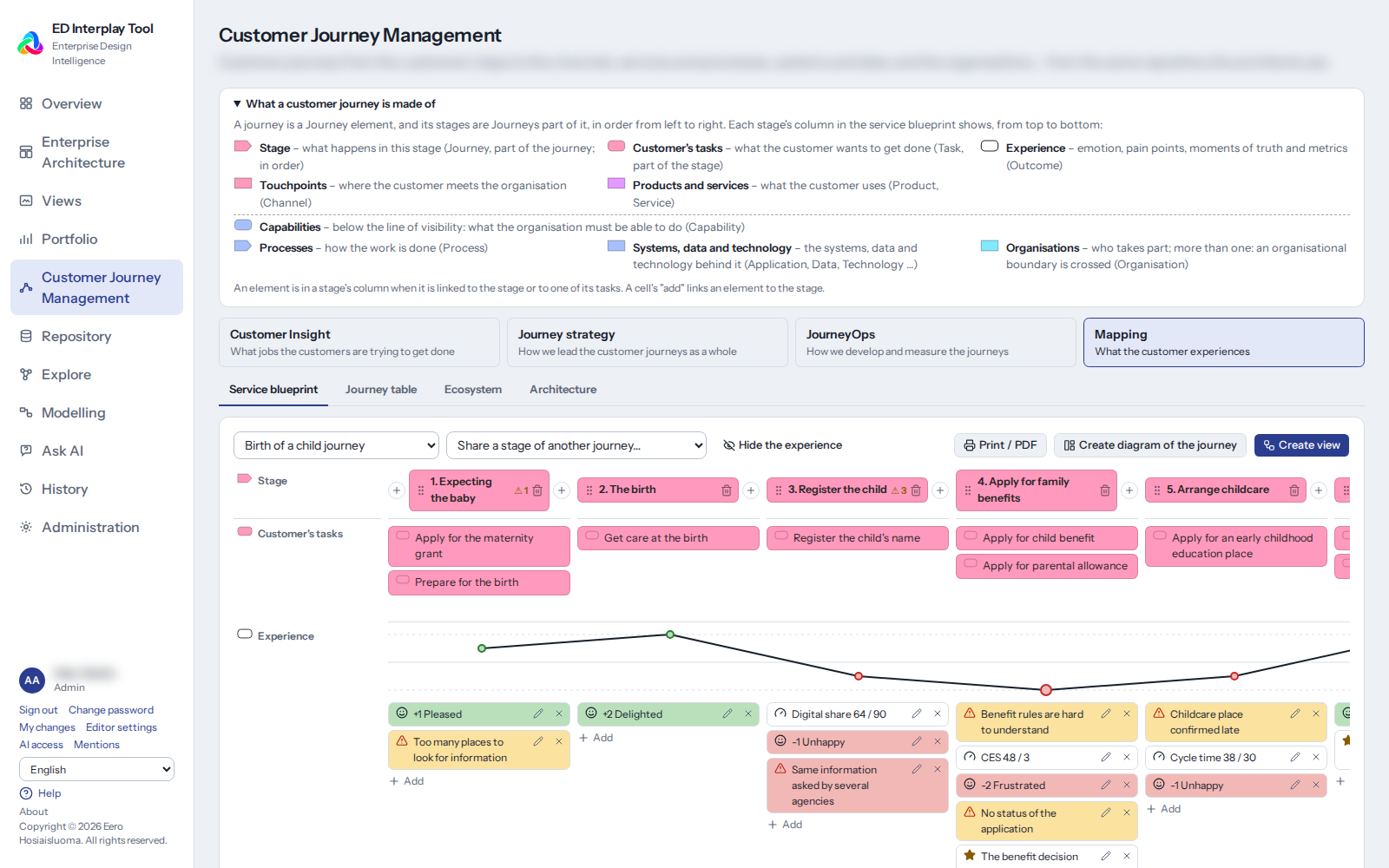
Customer journeys (CJM). The service designer's view for describing customer journeys. A journey and its stages are EDGY Journey elements, channels and touchpoints are Channel elements, and the customer's needs are Task elements. For customer journey mapping, the journey map shows the stages in time order with the activities, channels, data and systems beneath them, so you see at once what lies behind each stage. Clicking a stage opens its card, where its details can be edited.

Customer journeys: the journey map

Customer understanding. The customer's jobs to be done (JTBD), interviews and insights, the stakeholder map, the value proposition map and the business model are described with EDGY elements in the same repository, so they connect directly to journeys, services and capabilities.

Enterprise architecture (EAM). The architect's view, answering how the business connects to data, systems and technologies:

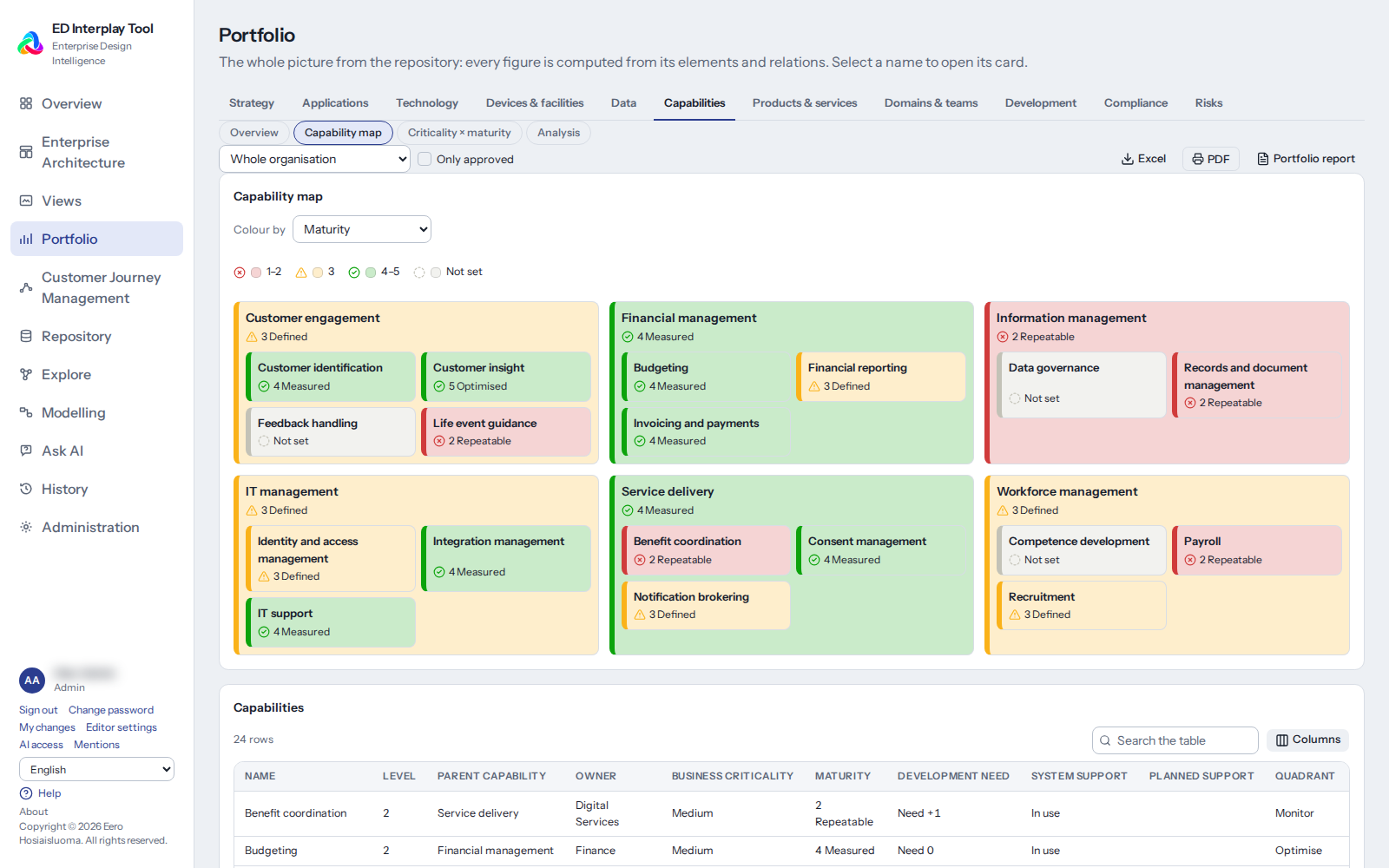
  • Business capability map from capability areas and groups down to single capabilities.
  • Process map from main processes down to sub-processes. A process's card shows its relationships, such as its systems and owner.
  • Application landscape (the system map) and dependency analysis: which systems, data and services depend on one another.
  • The hierarchy levels of capabilities and processes are computed from the structure.
The capability map
The capability map

Portfolio. A fact-based overview for management and architects:

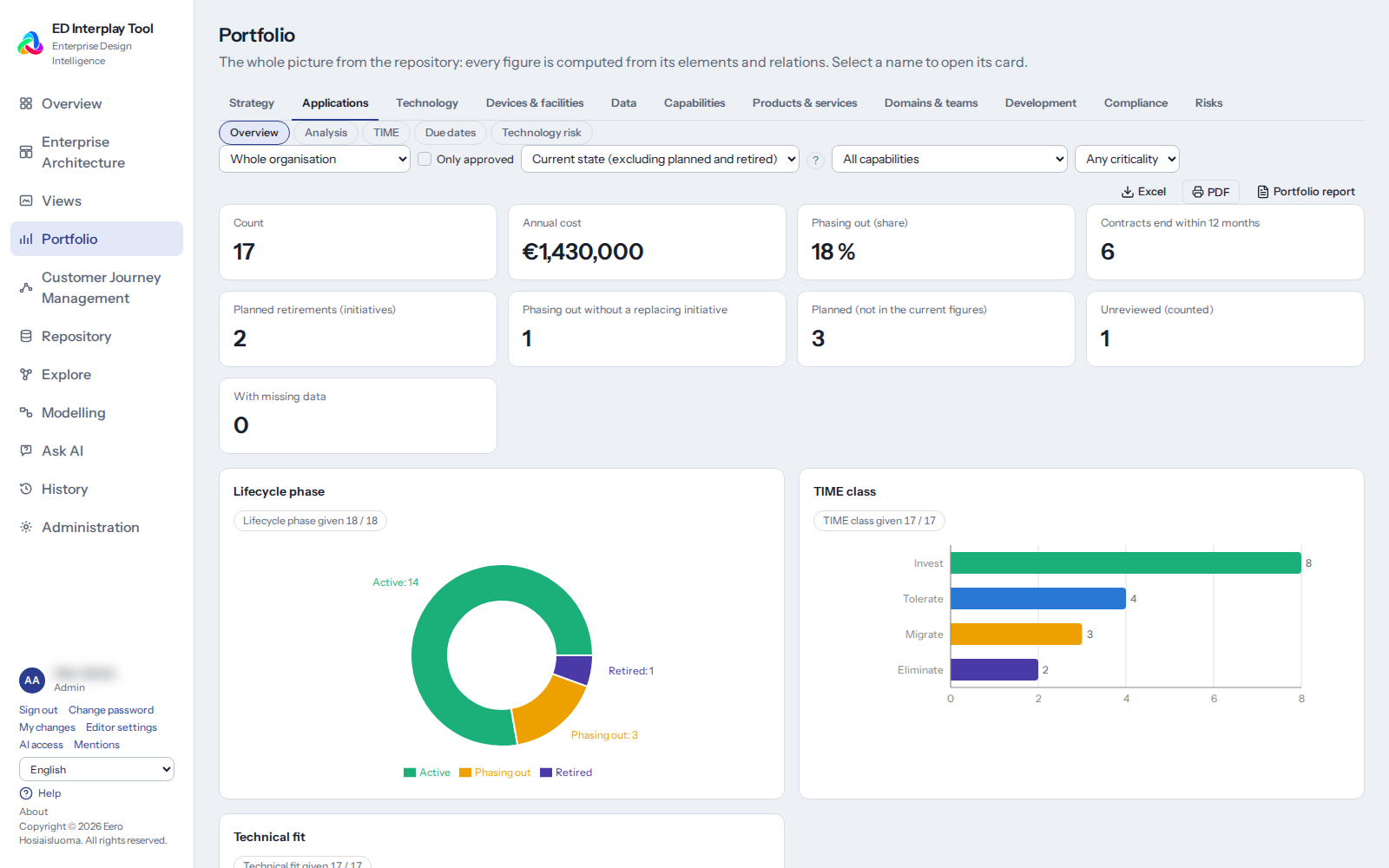
  • Application and technology portfolio: lifecycle, technical fit, costs and end dates as charts and tables.
  • Strategy: for strategic planning, how strategic goals connect to what delivers them, as a dashboard for management.
  • Risks: the risk register and risk matrix. A risk is linked to any element, and its causes, consequences and controls show in the same model.
  • Sourcing: how a capability is provided (own, partnership, outsourced) and an initiative's make or buy choice (make, buy, reuse, partner). Grouped and compared in the Portfolio's Analysis view.
Portfolio
Portfolio

Regulation and compliance. Regulation packs (GDPR, the Finnish Information Management Act and the EU AI Act) add the information and checks the elements need. Gaps show in the Portfolio, and reports include the information management model and the AI register. The requirements are guidance and not legal advice.

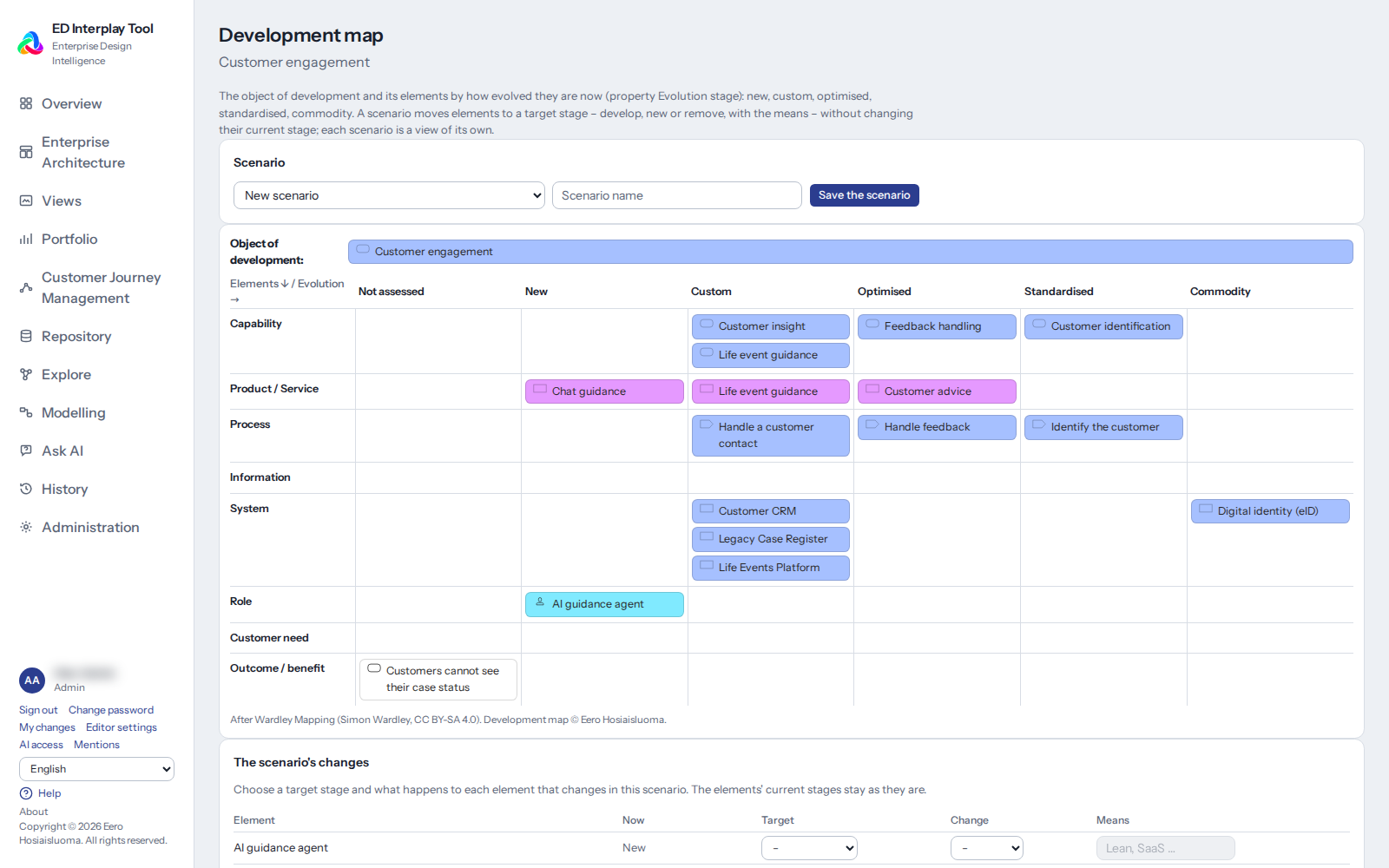
Operational Development Map (ODM). A scenario tool adapted from Wardley Mapping that shows each item's stage of evolution (new, custom-built, optimised, standardised, commodity) and its state (current state, target state, new, develop, remove). Current and target state appear side by side, and the map shows where your own investment pays off and what can be bought ready-made.

The Operational Development Map

Development. Initiatives (programmes, projects, concepts) and their roadmap, linked to the capabilities, processes and systems they affect. Light on purpose: ED Interplay Tool does not replace a project management tool, but its impact analysis shows how changes affect the whole.

Saved views. The Portfolio's, Explore's and analyses' selections can be saved and shared, so you always return to the same whole from the same angle.

AI and agents

Ask AI. Ask in natural language, and the answer is built from the organisation's own elements and relationships. The AI model runs as a local model in the organisation's own environment, so the repository never goes to an outside service.

MCP server for AI agents. Agents use the repository as context, so their answers are grounded in the organisation's own model. The connection is read-only, with an access key, under the user's own permissions.

Modelling and diagrams

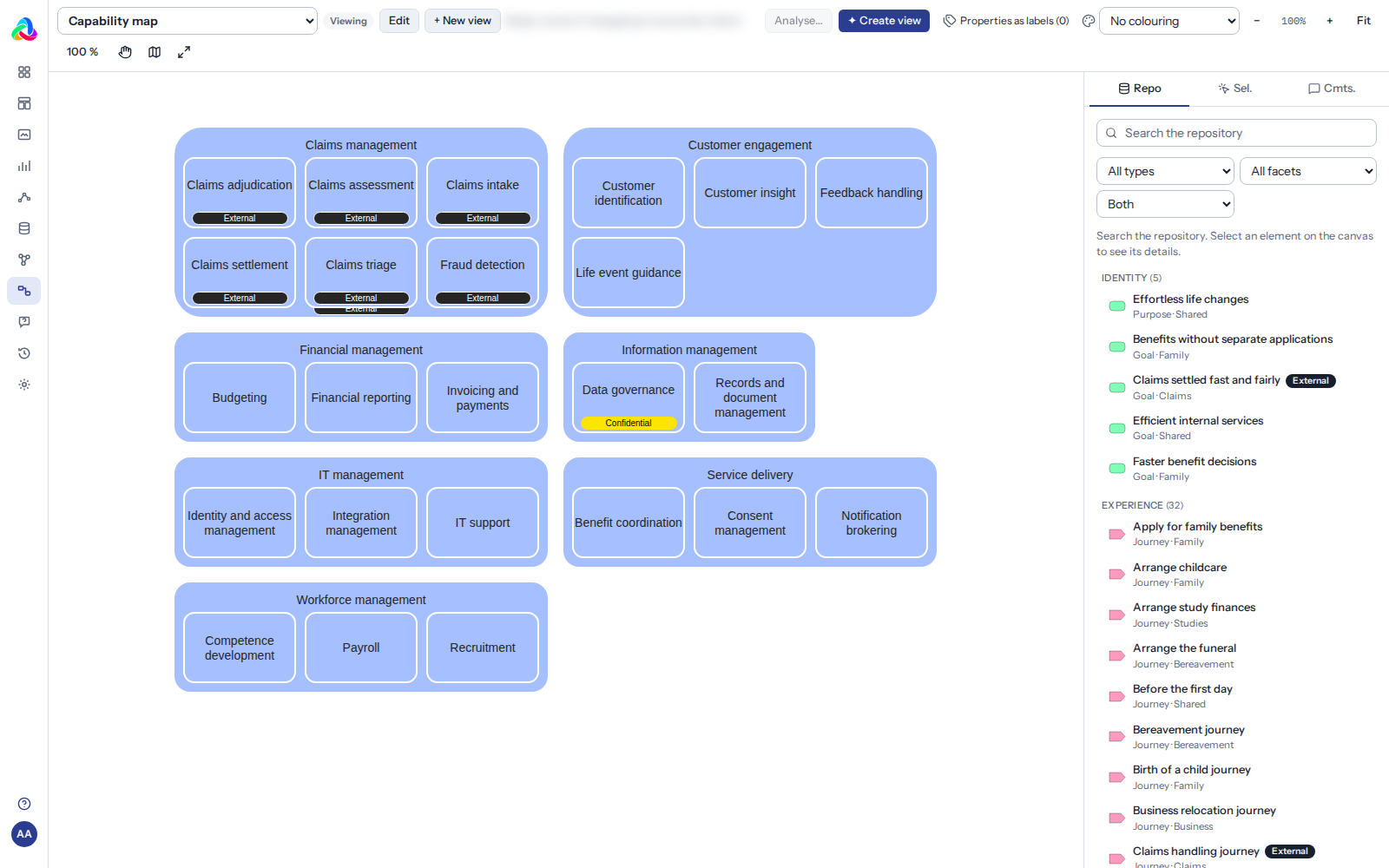
EDGY modelling editor. Diagrams are modelled in an editor based on draw.io with EDGY's official palette. An element in a diagram is an element of the repository, so the same capability or system can appear in many diagrams and a change updates them all.

Diagram from an element. From a chosen element comes a diagram of its connections, one to three levels deep. The layout puts the element in the middle and Flow chains in their order, and if a relationship cannot be drawn clear of the elements, the diagram says so.

Diagram of the selected. From several selected elements comes a diagram of the dependencies between them.

Impact analysis. From an element's card, see which customer journeys, processes, capabilities, data and systems a change affects, and what the element itself depends on. The analysis follows the dependencies in both directions, up to three steps away. It also shows the organisations involved, the initiatives that affect the element, and the customer journeys with their stages and customers, and the result opens as a graph.

Explore view. Browse an element's connections as a graph, one step at a time.

Tables and matrices. Elements and relationships as tables, and the data usage matrix: which systems store and use which data.

Search. Search elements and relationships by name, type and properties.

Properties and labels. Elements carry only the properties their features need, plus free name–value pairs and a web link. Labels and metrics add information to a diagram without new elements.

Language. The user interface is in Finnish and English. A role can have a default language, and users can change their language themselves.

The EDGY modelling editor

Import, export and backups

Getting started begins with what the organisation already has.

Tables (CSV and Excel). The import previews the rows first, the user chooses the rows to import, and errors and duplicates are shown.

Existing models. ArchiMate models (ArchiMate Model Exchange File Format) are converted into EDGY elements and relationships, so earlier modelling work need not be done again.

From Lite to the full edition. A model made with ED Interplay Tool Lite moves into the full edition, so a pilot can start light.

Export and backup. The repository can be exported to a file and restored. An update takes a backup before any change, and an update must never break stored data.

Quality. The context quality report (Administration) shows, for example, which elements lack a description or an owner, and how fully the elements are connected.

Users, roles and administration

Roles and permissions. Every role has its own permissions and suggested menu items, for example Customer journeys for the service designer and Enterprise architecture for the architect. The system administrator is responsible for administration.

User management. Users, roles and sign-in are managed in Administration.

Configuration. Administration sets the states and lifecycles, properties and the content of views. The tool adapts to the organisation's practices without programming.

Living content. Help, links and defaults are maintained in Administration, not in code.

Event log. Changes and sign-ins are logged.

Installation, security and quality

Installed in the organisation's own environment. ED Interplay Tool is delivered as containers installed on the organisation's own server. The data stays under the organisation's control, and the repository is never sent to the supplier or to third parties.

Security.

  • Encrypted connection (HTTPS), and only the web server is open to the network. The application and the database listen only on the internal network.
  • Passwords are stored as hashes, and the session uses a secure cookie.
  • A strict content security policy (CSP): no external scripts or sources.
  • Imported files are handled safely (for example XML and Excel formulas).
  • Production mode stops the start-up if the settings are incomplete.
  • Only open-source libraries whose licences suit commercial use are used as dependencies.

Quality and way of working.

  • An extensive automated test suite: unit tests and user interface tests, every feature on Chromium and the main paths on Firefox and WebKit too.
  • A version is released only when the whole test suite has passed cleanly on that very version.
  • Features once tested stay working, and test expectations change only for an approved reason.
  • Changes visible to users are agreed before they are made.
  • The release history and versions are traceable.

In development

The following features are planned or under way. No schedules are given here, and the order may change with users' needs.

Process management (BPM). A Processes view of its own and a process card: process diagrams with their steps, tasks, roles and decision points, described with EDGY.

Your own element specialisations in Administration, for example Object → Contract.

Broader import: draw.io diagrams straight into the full edition, and choosing a table's columns on import.

Dependency matrices, for example between processes and systems.

Sharing administration tasks among several main users.

Publishing to Confluence. Views shared to the organisation's wiki.

Installation on container platforms, for example OpenShift.

The product family and contact

ED Interplay Tool LiteED Interplay Tool
ForA single modeller, a small team, a pilotThe organisation's groups of experts together
UseIn the browser, no sign-inIn the browser, users and roles
StorageA file on your own computerA shared repository
ViewsDiagrams, the model, exploringEvery view, Portfolio and the Operational Development Map
PriceFreeLicence

Both are built on the same code base, so a model made with Lite moves to the full edition as it is. The free Lite is a good way to get to know EDGY modelling before the organisation takes the tool into use.

Try it and get in touch

Further information is available on request.

EDGY is an open design language developed by Intersection Group. The Enterprise Wheel, Enterprise Flow and the Operational Development Map (ODM) are Eero Hosiaisluoma's extensions to EDGY.